
Check less. Optimize more.
You’re responsible for PPC performance – at an agency or in your own company. PaceViewer checks your individually defined KPI goals every day and shows you where to take a closer look. Instead of checking every account yourself.
Start free · No credit card · All features
SOUND FAMILIAR?
The same KPIs every morning? There’s an easier way.
Open accounts. Switch between Google Ads and Microsoft Advertising. Check metrics. And only then know where something isn’t going to plan.
You’re needed for optimizing. Not for constantly checking.
Account hopping
Switching between ad accounts and platforms to check the status.
Always the same checks
Checking KPIs even though many targets are being met.
Excel instead of optimization
Comparing values instead of planning the next actions.
Spotting deviations late
Only knowing what needs attention after the round of checks.
YOUR MONITORING ASSISTANT
You optimize. PaceViewer monitors.
You define which results should be achieved. PaceViewer checks your KPI targets every day – across both ad platforms, too. You see the results in the dashboard. If you like, you get an email when deviations occur.
YOUR MORNING CAN BE EASIER
From first glance to the right action. No detours.
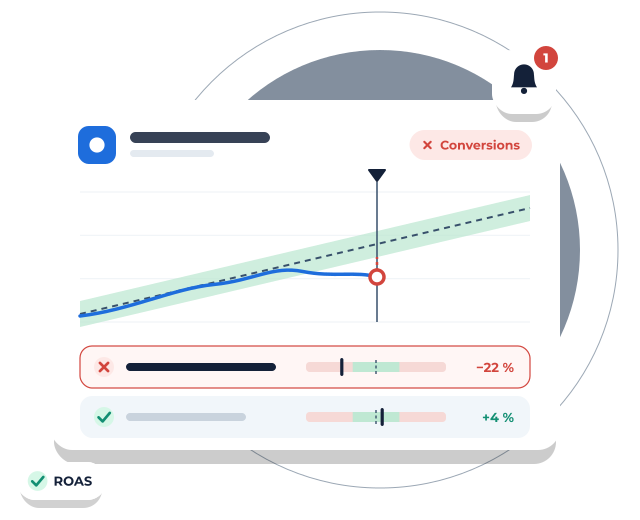
Monday morning. Several accounts, different goals. PaceViewer shows you where to take a closer look.
- Am I on target? In the dashboard, you see every KPI as a pacing chart – with target value, actual value and an individual tolerance range.
- What stands out? The goal detail view shows you trends, campaign data and comparisons with earlier intervals. So you can better put possible causes and seasonal patterns into context.
- What do I do now? That’s your call. Without having to check every account yourself first.
Check less. Act with more focus.
THE PACING CHART
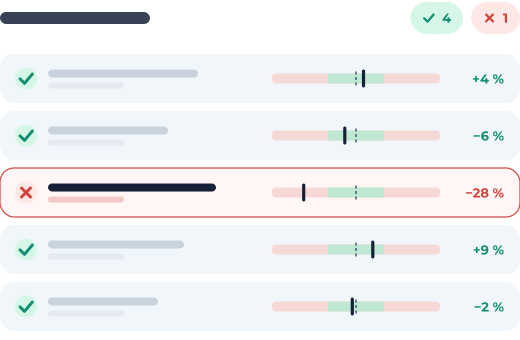
One bar. And you know how far you are from your target.
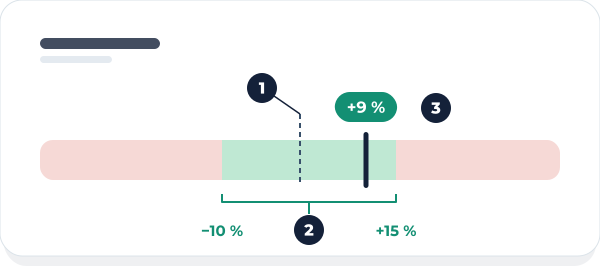
Every metric in your goal gets its own pacing chart on the dashboard. Here’s how to read it:
- Target value: The dashed line shows where your KPI should be by the end of the previous day – based on your individual goal path.
- Target range: The green area shows the allowed deviations above and below. You set them individually in percent for each KPI.
- Actual value: The thick line shows the result actually achieved by the end of the previous day. The label shows the deviation from target.
If the actual value is outside the target range, it’s worth taking a look at the goal detail view.
YOUR PERFORMANCE GOALS. YOUR RULES.
Not every campaign runs the same. Your monitoring has to keep up.
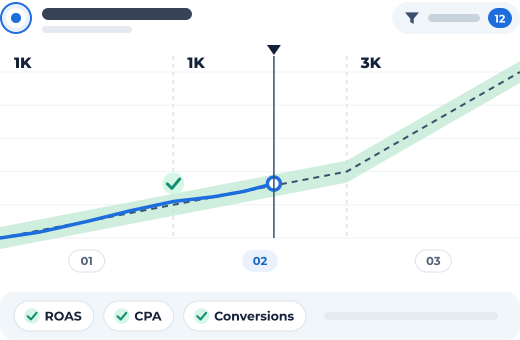
A three-month term. A €1,000 revenue target in each of the first two months. €3,000 in the third. Why should your monitoring expect the same target value everywhere?
Set time periods and distribute target values freely across the intervals. Combine several KPIs, filter campaigns specifically and monitor Google Ads and Microsoft Advertising together if needed.
Each KPI is evaluated independently. No offsetting, no hidden overall score.
ALL FEATURES FOR YOUR PPC WORK
The important KPIs in view. Without constant checks.
For ongoing campaign control, clear targets and better decisions – in an agency team or in-house.
Your goals. Your rules. Always in view.
FROM EVERYDAY PPC WORK
One look in the morning. And it’s clear where action is needed.
At Onlinemarketingliebe, PaceViewer shows every morning which goals are within the target range and which need priority. The time saved goes into optimization.
“By switching from manual Excel lists to PaceViewer, we save more than 40 hours a month on monitoring and reporting. Our morning check instantly shows where action is needed – and the time we gain goes straight into strategic support for our clients.”
Onlinemarketingliebe GmbH
Performance marketing agency
BORN FROM PPC EXPERIENCE
Good PPC work takes more than daily KPI checks.
Analyzing campaigns, understanding connections, improving performance – that takes time. Repetitive rounds of checks should take as little of it as possible.
That’s why Hannes and Jan built PaceViewer. The idea: you set individual performance goals. PaceViewer monitors them and shows you which KPIs deviate from your targets.
READY IN THREE STEPS
Define once. Keep in view every day.
Without having to replace your existing reporting processes.
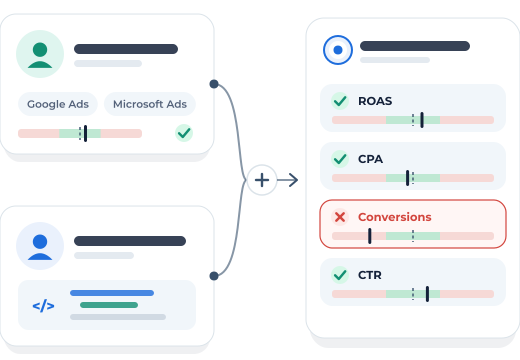
Select ad accounts
Connect Google Ads or Microsoft Advertising and choose the accounts you want to monitor.
Define goals
Define KPIs, schedules, individual target values, tolerance ranges and relevant campaigns.
Keep the overview
PaceViewer monitors your goals. You spot deviations and decide where to adjust.
TRANSPARENT PRICING
More time for performance. Not for routine.
All features included. Your plan is based on the actual ad spend of the accounts you select for PaceViewer over the last 30 completed days. Not on the number of your users or ad accounts.
ALWAYS INCLUDED
Everything included. From day one.
- All features
- Unlimited users
- Google Ads accounts
- Microsoft Ads accounts
- Individual KPI goals
- Email alerts
- PowerPoint reporting
- Workspaces & permissions
- Guided onboarding
- 30-day free trial
Your ad accounts stay under your control.
PaceViewer monitors with read-only access, makes no automatic changes and never notifies account owners.
GOOD QUESTIONS. CLEAR ANSWERS.
Quickly clarified. Before you start.
Do I need PaceViewer if I already use Google Ads and Microsoft Advertising?
The ad platforms show you performance data. PaceViewer checks your individually defined KPI goals every day and makes deviations visible in one central place.
Does PaceViewer replace Looker Studio or my reporting?
No. Reporting shows developments and results. PaceViewer adds automatic monitoring of your defined goals and targeted alerts to your processes.
Does PaceViewer also work for in-house marketing without client accounts?
Yes. Whether you manage your own ad account, several brands or clients at an agency: you can monitor the respective performance goals.
Which metrics can PaceViewer monitor?
You can monitor the key performance metrics from Google Ads and Microsoft Advertising – for example cost, clicks, impressions, conversions, revenue (conversion value), ROAS, RPC, RPA, CPA, CVR, CTR and CPC.
PaceViewer also lets you monitor search impressions (SI), search impression share (IS) and potential search impressions (PSI). Please note that with account-wide monitoring, there can be significant deviations between PaceViewer and the ad account. At campaign level, minor deviations (up to 3%) are possible.
Can I set different target values for individual months?
Yes. You define individual goal periods and distribute target values freely across the intervals – for example €1,000 in revenue in the first and second month and €3,000 in the third.
What happens if a goal contains several KPIs?
Each KPI is evaluated independently and has its own target values and tolerance limits.
Reaching a revenue target, for example, doesn’t offset a ROAS deviation. In the dashboard, you see all KPIs of a goal side by side.
Does PaceViewer help you identify the causes of goal deviations?
Yes. In the goal detail view, you see how your KPIs develop, relevant campaign data and comparisons with earlier intervals.
This helps you put anomalies, possible causes and seasonal patterns into context. You decide which actions make sense.
How does the tolerance range work?
For every goal metric, you set a target value – and how many percent of deviation below and above are fine. Everything within this range counts as on target. Anything beyond it is clearly flagged and, if you like, shows up in your daily pacing report by email – one email per day listing every goal with a deviation.
Can lagging data (e.g. conversion delays) be taken into account in daily pacing?
Yes. For each monitored KPI, you can set its own delay in days. PaceViewer then evaluates the pacing of that KPI with a time lag – only once a day’s data is expected to be complete.
Example: Your goal runs monthly, and your conversions usually come in after 14 days. With a 14-day delay, PaceViewer doesn’t send a pacing report for this KPI during the first 14 days of an interval. On day 15, pacing is checked for day 1 of the interval, on day 16 for day 2, and so on.
This way, you avoid false alarms caused by conversions that haven’t been recorded yet. In addition, PaceViewer refreshes the last 90 days with every sync so that conversions attributed later are taken into account.
How secure is our advertising and performance data?
PaceViewer only has read-only access to ad accounts and never changes campaigns, bids or budgets.
In regular administration, PaceViewer staff only see information on organization, account management and billing. Individual performance analyses and reports are not visible there. Further access may be required as part of necessary technical troubleshooting.
The application data is hosted on servers in Germany.
Do clients or account owners get notified?
No. PaceViewer never notifies connected ad accounts about its use. It only reads performance data – campaigns, bids and budgets stay untouched. Good to know: the PowerPoint export includes the PaceViewer logo, so PaceViewer is visible if you share it.
How up to date is the performance data in PaceViewer?
PaceViewer usually syncs Google Ads and Microsoft Advertising about every six hours.
Each sync also refreshes the data of the last 90 days. That way, conversions that are recorded or attributed later can be taken into account as well.
Only completed days are used for the daily pacing evaluation.
What’s in the daily pacing report?
If you like, you get an email once a day with all KPIs that are outside their defined target range.
A KPI keeps appearing on consecutive days as long as it remains outside the target range.
The current day is not included in the evaluation.
Can I select specific campaigns within an ad account?
Yes. You can select campaigns specifically or filter them dynamically by campaign name and label.
Can Google Ads and Microsoft Advertising run in one shared goal?
Yes. Performance goals can be defined across platforms.
Do I have to set up every goal again for new campaigns?
Not necessarily. Dynamic filters can capture matching campaigns by name and label.
Can I exclude specific weekdays from monitoring?
Yes. You can exclude individual weekdays in the schedule, for example if your campaigns don’t run on weekends.
PaceViewer takes these days into account when calculating the target value and distributes the target accordingly across the remaining days.
Can PaceViewer change campaigns or budgets automatically?
No. PaceViewer accesses the ad accounts read-only and never changes campaigns, bids or budgets.
Can my team work with PaceViewer?
Yes. Workspaces and permissions support shared organization. Users and ad accounts are included without limits in the pricing model.
How do I make the case for PaceViewer to my team lead?
Show how much time recurring KPI checks take today. With the free trial, you can test together how PaceViewer fits into your workflow.
Can I try PaceViewer for free?
Yes. You can test PaceViewer for 30 days with all features and no credit card.
YOUR TIME BELONGS TO OPTIMIZATION.
Make campaigns better. Not your checklists longer.
Whether agency or in-house team: PaceViewer monitors your individual PPC goals. You spot deviations and focus on the next meaningful actions.
Start free · No credit card · All features